
 One of the ways to create visibility through social media is to create an event on Facebook.
If you have an event, then you can promote it on Facebook and then link out to a registration page.
The benefit is that this will create social proof and will provide an opportunity for viral marketing.
Here is a simple step by step process to create a Facebook Event:
1. Go to the Events Page:
Visit https://www.facebook.com/events/
Click on Create Event in the upper right corner. That will open a new window where you can enter information regarding your event.
2. Event Name
This is the name of the event and it’s what will be shown when someone receives a notification about the event. If your event has a top name speaker, you may want to include their name in the name of the event.
3. Event Details
This is the largest block of space to enter event information. This is where you can promote your event. Include as many details as you think people will need initially. This is just a space for plain text, so you don’t have much of an opportunity to format the text.
Be sure to include several links to your registration page. You can use capital letters to call attention.
4. Location
Include the event location. Facebook may recognize the event location and even insert an option to view a map.
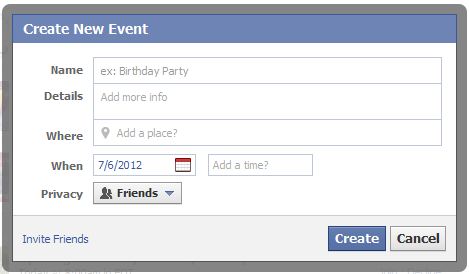
5. Date & Time
Enter the date of the event. Then, add the start and end time for the event. The field for the end time will appear after you enter the start time.
6. Privacy
Is this a public or a private event? Choose who you want to be able to see the event. Note that selecting public doesn’t notify anyone of the event. See the step below for Inviting Friends.
7. Event Photo
Selecting a photo for your event can help to add a nice visual element to draw attention. Think about how people will see your event. On the event page, you can only see a small thumbnail image of the photo. So, don’t select a photo with a lot of small text.
If you are the speaker at the event, then you can use your own photo.
8. Invite Friends
The last step in the process is to invite people to the event. This is the most tedious part of the entire process because you have to select a checkbox next to each person’s name.
Here’s a tip: you can select a list of filter the names of your friends. This can save time if you have created a list with people you want to invite to events.
Add an event today and start capitalizing on the opportunities to promote your events through Facebook.
Rick Cooper
Online Marketing and Social Media Trainer
 A simple tool you can use to get more traffic to your website is social bookmarking sites.
 Many years ago, I learned a valuable principle that I follow to this day. It is simple and yet it’s powerful. It is based on the fact that people do business with people they know, like and trust.
 People often ask me what is a good strategy to position them as an expert online.
 I received the following message today and thought I would share it. I have been a participant of multiple Meetup groups. I also launched a local networking group using the Meetup site called the
  I love sales and marketing. It’s one of my passions in life. And I love sharing ideas with people to provide an opportunity to experience a transformation that can improve their results.
 “I pride myself in listening. When you have people paying attention to you, your biggest job is to listen what they want. Deliver what your community wants.”
Connect with me Online: